To generate AI faces, select an AI image generator like Midjourney or Stable Diffusion, enter a descriptive text prompt detailing demographic features, lighting, and camera settings, and click render. Alternatively, specialized portrait platforms allow you to adjust parametric sliders for age, emotion, and ethnicity to instantly produce high-resolution, royalty-free human portraits.
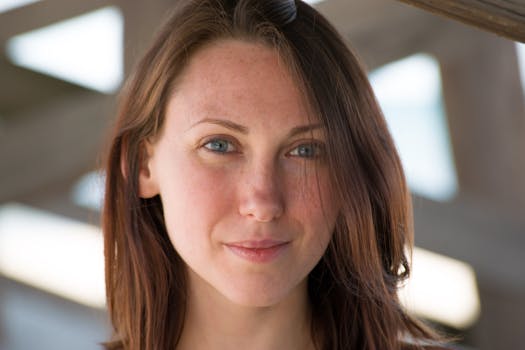
Artificial intelligence has completely transformed digital imagery. Creating realistic human faces that do not exist in real life is now accessible to anyone with an internet connection. Understanding the underlying technology helps you craft better prompts and achieve hyper-realistic results.
1. How AI Face Generation Works
Generative Adversarial Networks (GANs)
Generative Adversarial Networks were the primary engine behind early AI face generation. A GAN consists of two neural networks working in opposition: a generator and a discriminator. The generator creates random facial images, while the discriminator evaluates them against thousands of real human photographs.
Through millions of iterations, the generator learns to fool the discriminator by producing realistic skin textures, eye reflections, and facial proportions. Platforms like “This Person Does Not Exist” rely on GAN architectures (specifically StyleGAN) to yield instant, single-click facial portraits.
Latent Diffusion Models
Modern image creation has shifted primarily toward latent diffusion models. Tools like Stable Diffusion, Midjourney, and DALL-E 3 use diffusion to generate portraits. Diffusion models start with a field of pure digital noise and iteratively denoise the canvas, guided by your text input, until a clear image emerges.
Diffusion models excel at understanding complex text prompts. They allow users to specify intricate details such as camera lenses, studio lighting setups, cultural aesthetics, and subtle emotional expressions that older GAN systems struggled to interpret accurately.
2. Step-by-Step Guide: How to Generate AI Faces
Generating realistic human portraits requires a balance of platform selection, detailed text inputs, and post-processing. Follow this step-by-step workflow to build photorealistic AI human faces from scratch.
Step 1: Select Your AI Generator Platform
First, decide whether you want a prompt-based generator or a slider-based interface. Prompt-based tools offer vast artistic freedom, allowing you to control the environment, clothing, and overall mood. Slider-based tools focus strictly on isolated portraits with fine-tuned control over specific anatomical sliders.
If you are new to the process, web-based tools with simple text boxes provide the fastest onboarding. Power users seeking total privacy and zero usage fees often choose to install open-source diffusion models locally on their personal computer hardware.
Step 2: Write Descriptive Text Prompts
The quality of your output depends heavily on your prompt structure. Avoid generic requests like “a handsome man” or “a pretty woman.” Instead, build a layered prompt that specifies key physical characteristics, lighting conditions, and camera parameters.
- Subject: “A close-up portrait of a 35-year-old Hispanic woman with subtle freckles and dark wavy hair.”
- Lighting: “Soft natural morning light coming from a side window, Rembrandt lighting, subtle catchlights in the eyes.”
- Camera Details: “Shot on 85mm portrait lens, f/1.8 aperture, shallow depth of field, blurred background.”
- Texture & Realism: “Unfiltered skin texture, visible pores, realistic hair strands, raw photograph.”
Combining these elements forces the AI model to bypass smooth, airbrushed textures in favor of photographic detail.
Step 3: Configure Parameters and Aspect Ratios
Most advanced AI face generators allow you to adjust technical parameters before rendering:
- Aspect Ratio: Standard headshots look best at vertical aspect ratios such as 4:5 or 2:3. In Midjourney, append
--ar 4:5to your prompt. - Prompt Weight (CFG Scale): Controls how strictly the AI follows your text prompt. A scale between 7 and 9 usually strikes the right balance between prompt accuracy and natural variation.
- Seed Values: Saving a specific seed number allows you to re-generate the exact same face later with minor variations in clothing or background.
Step 4: Refine, Upscale, and Fix Artifacts
Initial renders may occasionally display minor glitches, such as asymmetrical pupils, mismatched earrings, or strange skin smudges. Use built-in variations or “inpainting” tools to repaint specific areas of the face without changing the rest of the headshot.
Once you are satisfied with the expression and geometry, pass the portrait through a dedicated face upscaler. Upscaling algorithms sharpen micro-details like eyelashes, pores, and iris patterns without introducing unwanted noise.
3. Comparing Popular AI Face Generation Tools
Selecting the right software depends on your technical budget, creative goals, and workflow preference. Below is an overview comparing the leading AI face generation engines available today.
Comparison of AI Face Generators
| Tool Name | Technology | Control Method | Skill Level Required | Primary Best Use Case |
|---|---|---|---|---|
| Midjourney | Diffusion | Text Prompts & Parameters | Intermediate | Photorealistic Studio Portraits |
| Stable Diffusion | Latent Diffusion | Prompts, ControlNet, LoRAs | Advanced | Custom Workflows & Face Consistency |
| Generated Photos | StyleGAN | Parametric Sliders & Filters | Beginner | Stock Photos & Marketing Models |
| DALL-E 3 | Diffusion | Conversational Text Prompts | Beginner | Rapid Character Ideation |
| Adobe Firefly | Diffusion | Prompts & Style Controls | Beginner to Intermediate | Commercial Design & Stock Integration |
Tool Overviews and Capabilities
- Midjourney: Widely regarded for producing cinematic lighting and life-like skin textures. It operates through Discord or a web interface and handles complex camera descriptors exceptionally well.
- Stable Diffusion: An open-source model that runs locally on your PC graphics card. It offers ultimate customizability through extensions like ControlNet, allowing you to copy exact pose structures from reference images.
- Generated Photos: A parametric platform designed specifically for generating headshots. Users adjust physical traits—such as age, hair length, eye color, and emotion—using graphical sliders rather than typing long prompts.
- DALL-E 3: Integrated directly into ChatGPT, making it simple to request facial images using natural human conversation. It is ideal for quick mockups and conceptual work.
4. Key Prompting Techniques for Photorealistic Results
To bypass the artificial, “plastic” look common in low-effort AI renders, you must implement specific prompting strategies that mimic professional photography.
Camera and Lens Specifications
AI engines are trained on millions of indexed photographic metadata tags. Including specific camera bodies, lens focal lengths, and f-stops instructs the model to replicate optical depth and perspective distortion realistically.
- Focal Lengths: Use “85mm lens” or “105mm portrait lens” for flattering facial geometry. Wide-angle lens descriptors (like 24mm) will warp facial features unnaturally.
- Aperture: Specify “f/1.8” or “f/2.8” to create a shallow depth of field, which keeps the face sharp while smoothly blurring the background (bokeh effect).
- Film Grain & Camera Types: Mentioning “shot on 35mm film” or specifying high-end cameras like “Hasselblad H6D” introduces realistic grain patterns and dynamic color ranges.
Lighting Techniques and Skin Micro-Details
Realistic human skin is imperfect. If you do not explicitly ask for natural flaws, the AI engine tends to default to smooth, airbrushed textures that look fake.
- Specify Lighting Angles: Incorporate terms like “volumetric lighting,” “butterfly lighting,” or “golden hour rim light.” Directed light creates natural shadows along the jawline, cheekbones, and nose bridge, adding three-dimensional depth.
- Prompt for Skin Imperfections: Actively request “fine pores,” “subtle laugh lines,” “slight skin unevenness,” or “peach fuzz.”
- Use Negative Prompts: In platforms like Stable Diffusion, add terms to your negative prompt bar such as:
airbrushed, plastic skin, CGI, 3D render, smooth texture, over-clipping, blurred eyes, extra limbs.
5. Our Top Pick
When evaluating image fidelity, skin texture, lighting accuracy, and artistic versatility, Midjourney stands out as the single best overall tool for creating AI human faces.
While open-source alternatives require extensive hardware setup and local configuration, Midjourney delivers photorealistic headshots directly out of the box. Its latest model versions excel at rendering hyper-realistic skin micro-details, natural facial asymmetry, complex eye reflections, and realistic hair strands.
Whether you need a corporate avatar or a cinematic character portrait, Midjourney handles camera and lighting prompts far better than competing platforms. You can test and subscribe to the service by visiting the official platform (#).
6. Frequently Asked Questions
Are AI-generated faces legal for commercial use?
Yes, in most cases, you can use AI-generated human portraits for commercial projects like websites, advertisements, and marketing campaigns. However, you must ensure that your generated face does not unintentionally replicate the exact likeness of a real living person or public figure without permission. Always check your specific software platform’s terms of service regarding commercial usage rights.
How do I fix distorted eyes or hands in AI faces?
Distorted eyes or anatomical errors usually happen when rendering at low resolutions. You can fix these artifacts using inpainting features (like Midjourney’s Vary Region tool or Stable Diffusion’s inpaint tab) to select and re-render just the eye area. Alternatively, running the final output through a dedicated face restoration tool like CodeFormer or GFPGAN automatically corrects pupil shape and iris alignment.
Can I create a consistent AI face across multiple images?
Yes, creating a consistent character is possible using reference images, custom seeds, or trained character models. Advanced users train a Custom LoRA (Low-Rank Adaptation) model on Stable Diffusion using 10 to 15 base renders of a face. Midjourney also features character reference parameters (--cref) that allow you to maintain similar facial features across different poses, outfits, and backgrounds.
Are AI-generated portraits truly unique?
Yes, AI-generated human faces are statistically unique creations synthesized from complex mathematical vectors. Rather than stitching existing stock photos together, the neural network calculates pixel placement based on patterns learned during its training phase. While the faces look like real human beings, the specific individuals rendered do not actually exist.
What is the best resolution for AI-generated faces?
Most AI engines natively generate images between 1024x1024 and 1024x1536 pixels. To use these portraits for print or high-definition web displays, you should upscale the native render to 4K resolution (at least 3840 pixels on the long edge) using AI image upscalers like Topaz Gigapixel AI or free web-based upscaling utilities.
Can I generate an AI face from an existing photograph?
Yes, many AI image generators support image-to-image (img2img) workflows. You can upload an existing headshot as a visual prompt, adjust the image weight strength parameter, and add text prompts to modify specific attributes like hair color, background environment, lighting, or age while retaining the core facial structure of the original photo.
7. Conclusion
Learning how to generate ai faces provides content creators, marketers, and designers with an efficient way to build custom studio-quality portraits without hiring expensive photography gear or talent. By selecting the right generator, mastering photography-focused prompts, and applying parameter adjustments, you can easily render unique, photorealistic headshots in seconds. Take advantage of modern diffusion tools, experiment with detailed camera prompts, and refine your outputs to produce stunning digital portraits tailored specifically to your visual projects.